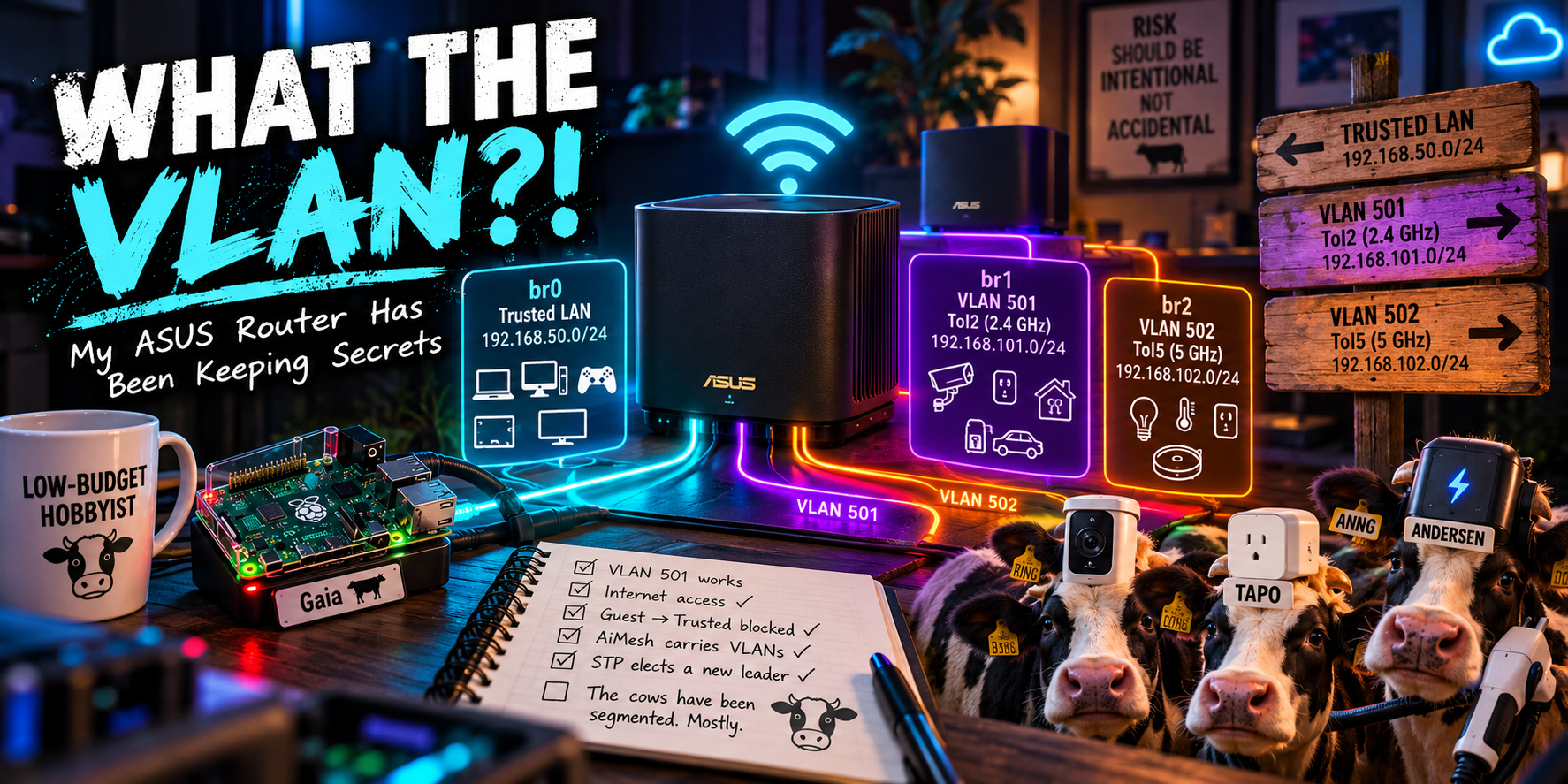
What The VLAN?! My ASUS Router Has Been Keeping Secrets
An ASUS ZenWiFi XT9 Mesh, a Raspberry Pi, two guest VLANs and no new networking hardware. What could possibly go wrong?
Sometimes security research begins with a vulnerability. Sometimes it begins with a design problem. This time it began with me wondering why my collection of internet-connected household appliances had quite so much access to my home network.
I’ve got Virgin Media gigabit broadband, two ASUS ZenWiFi XT9s in an AiMesh, a Raspberry Pi called Gaia doing considerably more work than is reasonable, and the usual growing herd of Ring cameras, smart plugs, TVs, a Hive Hub and an EV charger.
Most of it worked perfectly well on one network. Which is not the same thing as it being a good idea.
I wanted the cloud-dependent IoT devices off my trusted LAN, without breaking the devices that actually need to talk to Gaia. I previously had this with my Ubiquiti Dream Machine (UDM) but when it died I opted for the ASUS mesh because it had a decent feature set, decent reviews and way longer warranty than the UDM which has a shockingly short warranty.
ASUS has a guest-network setting called Access Intranet. Turn it off and, supposedly, guest clients get internet access but not local-network access.
Fine. But I wanted to know what the router actually did when I ticked that box because one thing I’ve learned in nearly three decades in enterprise IT and cybersecurity is that “Works As Documented” and “Works as Coded” can be wildly different and only the latter matters.
That was my first mistake. My second was enabling SSH.
My XT9 is apparently an XT8 Pro
The router identifies itself as a ZenWiFi XT9 in all the places a normal person would look. Its firmware variables were less decisive:
odmpid=ZenWiFi_XT9
productid=XT8PRO
model=ZenWiFi_XT8P
An identity crisis. Lovely.

That isn’t proof of a vulnerability or counterfeit device; shared platform identifiers are common in firmware. But it set the tone for the afternoon: the label on the box wasn’t necessarily going to explain the plumbing underneath.
VLAN 501, hiding in plain sight
With the 2.4 GHz guest network enabled, I ran brctl show on the primary XT9. Alongside the trusted bridge, br0, I found this:
br1
  eth1.501
  eth2.501
  eth3.501
  eth4.501
  eth5.501
  eth6.501
  wl0.1
  wds0.0.1.501
  wds2.0.1.501
For anyone who doesn’t spend their weekends interrogating routers: a bridge joins network interfaces into one Layer 2 network, and an 802.1Q VLAN tag lets multiple logically separate networks travel over the same physical link. The .501 suffix identifies VLAN 501 on each Ethernet or wireless-distribution interface.
My guest SSID (wl0.1) was attached to br1. So were VLAN-tagged versions of all six Ethernet interfaces and two AiMesh wireless-distribution interfaces.
And br1 had its own IPv4 network: 192.168.101.0/24, with the router at 192.168.101.1. Trusted devices stayed on br0, 192.168.50.0/24.
So this wasn’t just a second SSID. ASUS had built another broadcast domain, given it its own subnet, and apparently made it available over wired and wireless links.
Apparently is doing some work in that sentence. Finding an interface in a configuration doesn’t establish that traffic will flow through it.
I needed a test client.
A trunk port, a Raspberry Pi and a network namespace walked into a bar (this isn’t a joke)
Gaia is my Raspberry Pi 4B+ and runs NAS, Docker and media services. It’s a production household device, which is a polite way of saying that breaking it would be, how can I put this… unpopular.

It’s plugged into LAN1 of the primary XT9 as an ordinary untagged client, at 192.168.50.103. Rather than disturb that connection, I used a Linux network namespace: a separate network stack with its own interfaces, addresses and routes.
I created a VLAN 501 interface on Gaia’s existing Ethernet port, then moved only that virtual interface into the test namespace:
sudo modprobe 8021q
sudo ip netns add xt501
sudo ip link add link end0 name gaia501 type vlan id 501
sudo ip link set gaia501 netns xt501
sudo ip -n xt501 link set lo up
sudo ip -n xt501 link set gaia501 up
That left Gaia’s production address and route untouched. A DHCP client running inside the namespace then received a lease from the XT9’s guest network. The final test address was 192.168.101.77/24, with a default gateway of 192.168.101.1.
I could also reach the internet:
PING 1.1.1.1
2 packets transmitted, 2 received, 0% packet loss
That was the first substantial finding: an ordinary XT9 LAN port accepted tagged VLAN 501 frames from my Raspberry Pi, returned DHCP traffic, and routed the guest client’s traffic out to the internet. No managed switch or modified router firmware required.
Here’s the path I actually tested:
The dotted links illustrate the two logical networks carried by that one Ethernet connection, not additional physical cables.
A working VLAN isn’t an isolation control
Internet access was nice. Keeping the guest away from the trusted LAN was the actual point.
From the VLAN 501 namespace, I couldn’t ping Gaia’s trusted address or the router’s trusted gateway. More importantly, an SSH attempt to Gaia on 192.168.50.103:22 timed out:
ssh: connect to host 192.168.50.103 port 22:
Connection timed out
A timeout by itself isn’t evidence of where the traffic was stopped, particularly because my guest test client and trusted target lived on different network stacks on the same physical Pi. So I examined the XT9’s iptables forwarding rules and compared counters immediately before and after another short SSH attempt.
| IPv4 forwarding rule | Before | After | Difference |
|---|---|---|---|
Guest br1 → WGNPControls |
9 | 12 | +3 |
Guest br1 → WAN ACCEPT |
2 | 2 | 0 |
Final logdrop |
7 | 10 | +3 |
Both the guest-rule and final-drop byte counters increased by 180 bytes: three packets averaging 60 bytes. That’s consistent with TCP SYNs and retransmissions from the failed connection.
It’s strong correlated evidence that the router’s IPv4 forwarding policy rejected the SSH attempt. It is not packet-by-packet proof: these are aggregate counters, and I didn’t obtain matching kernel log entries. I also haven’t exhaustively tested every protocol, acceleration path or possible isolation bypass.
That distinction matters. I can say what I observed without turning it into a claim the experiment didn’t establish.
Then I enabled 5 GHz and found VLAN 502
I restored the guest SSID to All AiMesh Nodes, then enabled a corresponding 5 GHz guest network. I expected ASUS might put both SSIDs on the same guest bridge.
It didn’t.
I now had three separate bridges and subnets:
| Purpose | SSID | Bridge | VLAN | IPv4 subnet |
|---|---|---|---|---|
| Trusted LAN | WiFlyMeToTheMoon |
br0 |
Untagged | 192.168.50.0/24 |
| 2.4 GHz IoT | ToI2 |
br1 |
501 | 192.168.101.0/24 |
| 5 GHz IoT | ToI5 |
br2 |
502 | 192.168.102.0/24 |
ASUS created eth1.502 through eth6.502 and corresponding .502 interfaces for the AiMesh wireless links. Both guest bridges had equivalent-looking router-local DHCP/DNS allowances and WAN forwarding rules, and both Wi-Fi guest interfaces reported bridge-port isolation enabled.
I tested wired connectivity end to end on VLAN 501. I inspected VLAN 502’s configuration, but I didn’t repeat the full wired test on 502. Similar-looking configuration is not the same thing as identical verified behaviour.
The bedroom router won an election
One particularly entertaining discovery: both guest bridges had Spanning Tree Protocol (STP) enabled. STP is the mechanism switches and bridges use to avoid forwarding loops by agreeing on a root bridge and suitable paths through a Layer 2 topology.
VLAN 501 elected the primary XT9 as root. VLAN 502 elected a remote bridge, 6a:28:aa:d3:83:c6, reachable through wireless interface wds2.0.1.502. The forwarding database learned that same MAC through the root port, and repeated readings showed the election persisting.
I can’t SSH to the secondary XT9 to match the MAC directly, but with a two-node AiMesh, it’s overwhelmingly likely that the bedroom unit became VLAN 502’s STP root.
Not a fault. Just the secondary router apparently winning an election that nobody knew was being held.
The end-state design: segment by what devices actually need
I didn’t set out to achieve the highest possible VLAN count. I wanted to remove unnecessary access without breaking the house.
This is the intended end state, not a claim that every device had completed migration when I wrote the post. At the time of testing, four Ring devices and 2x Tapo P100 and an Andersen A2 EV Charger were already on ToI2; two stubborn Ring cameras were refusing to change network because Internet of Stubborn Things.
My phone remained on the trusted WiFlyMeToTheMoon SSID, and I could still manage the migrated devices in their vendor apps. That’s expected for cloud-mediated control: an app working through the internet does not mean the IoT device can initiate connections to my trusted LAN.
I deliberately kept the Fire TV Stick and both Samsung TVs on the trusted network. They use DLNA from Gaia. DLNA commonly uses SSDP multicast for discovery and direct HTTP connections for playback. Moving those devices to an isolated guest subnet could break both unless I also designed controlled cross-subnet discovery and access. That’s an entertaining project, but not one I need.
The wired Hive Hub and Virgin TV box also stayed put. I could probably pursue a managed-switch access port, or investigate reassignment of the XT9’s Ethernet bridge membership, but the latter is an unsupported runtime experiment on Broadcom hardware. I researched it and stopped before changing a working household connection into a household post-incident review.

The caveat ASUS’s GUI doesn’t explain
Here’s the part I wouldn’t ignore if I were treating this as a security architecture.
My experiment proved that an ordinary wired LAN port carries the untagged trusted network and accepts tagged VLAN 501. That’s useful for testing. It also means the port itself is not enforcing an exclusive guest-versus-trusted role: a sufficiently capable wired client can participate in the untagged trusted LAN regardless of the guest firewall’s isolation policy.
So I have two distinct statements:
- Guest Wi-Fi isolation: the tested guest client could reach the internet, while its attempted SSH connection to the trusted LAN failed with matching forwarding-drop counters.
- Wired port isolation: I have not established a port-level security boundary. The port exposes both the normal untagged LAN and tagged guest traffic.
Those aren’t contradictory. They’re different controls protecting different boundaries.
I also haven’t demonstrated that hand-edited bridge membership would survive a reboot, mesh reprovisioning or firmware update. The VLANs I investigated were automatically provisioned by ASUS’s stock guest-network feature. The unsupported changes I contemplated were deliberately left unapplied.
Capability is not obligation
I could have bought a managed switch, replaced the routers, added a firewall appliance and spent a weekend constructing what amounts to a small enterprise network. Some of that sounds rather fun.
But my goal wasn’t to create a network diagram with the maximum number of coloured boxes. It was to reduce accidental trust while preserving the services we actually use.
For that, I learned more by looking at the system than by reading the feature label. brctl revealed the guest bridges. VLAN-tagged DHCP demonstrated working wired transport. Internet probes verified guest routing. The failed SSH attempt and firewall counter changes gave me evidence consistent with an enforced IPv4 boundary. The AiMesh interfaces and STP tables explained where those Layer 2 networks extended.
Every observation answered a different question. None answered every question.
That’s the point I keep coming back to in security engineering: a configured feature is not automatically an effective control, and an available capability doesn’t oblige me to use it.
My XT9 still appears uncertain whether it’s an XT9 or an XT8 Pro. But it definitely knows about VLAN 501. And VLAN 502. And spanning tree. And apparently the bedroom unit has opinions about leadership.
All without buying another box.
ASUS said its guest network was isolated. “Trust me, br0!” I didn’t. I tested it.
Risk should be intentional, not accidental.
The cows have been segmented. Mostly. The Hive has diplomatic immunity. 🐄