
Hero image generated by ChatGPT This is a personal blog and all content herein is my own opinion and not that of my employer.
What The Entra Fudge?!
There’s a particular flavour of frustration that only appears when:
- you follow the documentation,
- you apply least privilege,
- you design sensible Conditional Access policies,
…and the platform still nudges you into doing something that feels wildly disproportionate.
That moment usually ends with:
“Wait… you want me to allow what from BYOD?”
This post is about one of those moments.
Specifically:
Microsoft’s guidance for enabling BYOD access to Dev Box recommends allowing the Microsoft Azure Service Management API (ARM) - and that’s a much bigger door than it sounds.
No vuln claims.
No pitchforks.
Just runtime reality, mental-model repair, and an undocumented workaround that changes the equation entirely.
Welcome back to What The Entra Fudge?!
The recommendation that raises an eyebrow
Microsoft’s official documentation for Dev Box Conditional Access includes the following scenario:
Scenario 2: Allow access to the developer portal
And the guidance boils down to:
Allow access to the Microsoft Azure Service Management API so users can access Dev Box from non-corporate devices.
On the surface, this sounds reasonable.
Dev Box is an Azure service.
The developer portal needs to know which Dev Centers and pools exist.
ARM is the Azure control plane.
So… allow ARM.
Except - and this is the important bit - ARM is not “the Dev Box API.”
ARM is the unified entry point for Azure’s control plane - including management, discovery, and resource operations.

And allowing it from BYOD has consequences.
Why allowing ARM from BYOD is a big deal
When you allow the Microsoft Azure Service Management API in Conditional Access, you’re not allowing:
- “Dev Box access”
- “Dev Center enumeration”
- “Read-only portal metadata”
You are allowing:
User-delegated access to Azure Resource Manager.
That includes:
- Resource enumeration
- Management plane discovery
- Any operation the user’s RBAC allows
Yes, RBAC still applies - but from a policy vantage point, allowing user-delegated ARM authentication expands the attack surface because you can’t easily reason about which operations might be reachable from an unmanaged device.
From a Conditional Access perspective, you’ve now said:
“This user, from this unmanaged device, may authenticate directly to the Azure control plane.”
That’s a very different risk profile from:
“This user may access a virtual workstation.”
And it gets worse.
The real issue: portal-driven user impersonation
The key problem isn’t Dev Box itself.
It’s how the developer portal works.
To render the Dev Box experience at:
https://devportal.microsoft.com
…the portal makes user-delegated ARM calls to enumerate:
- Dev Centers
- Projects
- Pools
In other words:
The portal impersonates the user and calls ARM directly.
This is why ARM must be allowed in Conditional Access.
And that’s the part that makes security engineers wince.
Because this could have been designed differently.

The obvious alternative that wasn’t taken
There is a much cleaner model here:
- Portal authenticates the user
- Portal makes server-to-server (S2S) calls to ARM
- User never gets direct ARM access from BYOD
- Conditional Access remains scoped
This pattern already exists elsewhere in Microsoft’s ecosystem.
But Dev Box doesn’t use it - at least not for the default portal flow.
Instead, we get:
“Just allow ARM from personal devices.”

Which is… suboptimal.
The undocumented workaround that changes everything
Here’s the part that isn’t in the docs.
The Dev Box portal supports a single Dev Center deep link mode:
https://devportal.microsoft.com/single-devcenter?features=singledevcentermode&devCenterUri=https://<tenantId>-<devCenterName>-<region>.devcenter.azure.com
When you access the portal this way:
- It lands you directly in one Dev Center
- No global enumeration happens
- ARM is not required
- Conditional Access does not need to allow the Azure Service Management API
You still get Dev Box access.
You just don’t blow a hole through your management plane to do it.
And here’s the kicker:
This mode is completely undocumented.
Try searching learn.microsoft.com for:
singledevcentermode
You’ll find nothing.
Bonus tip: where to actually get the Dev Center URI
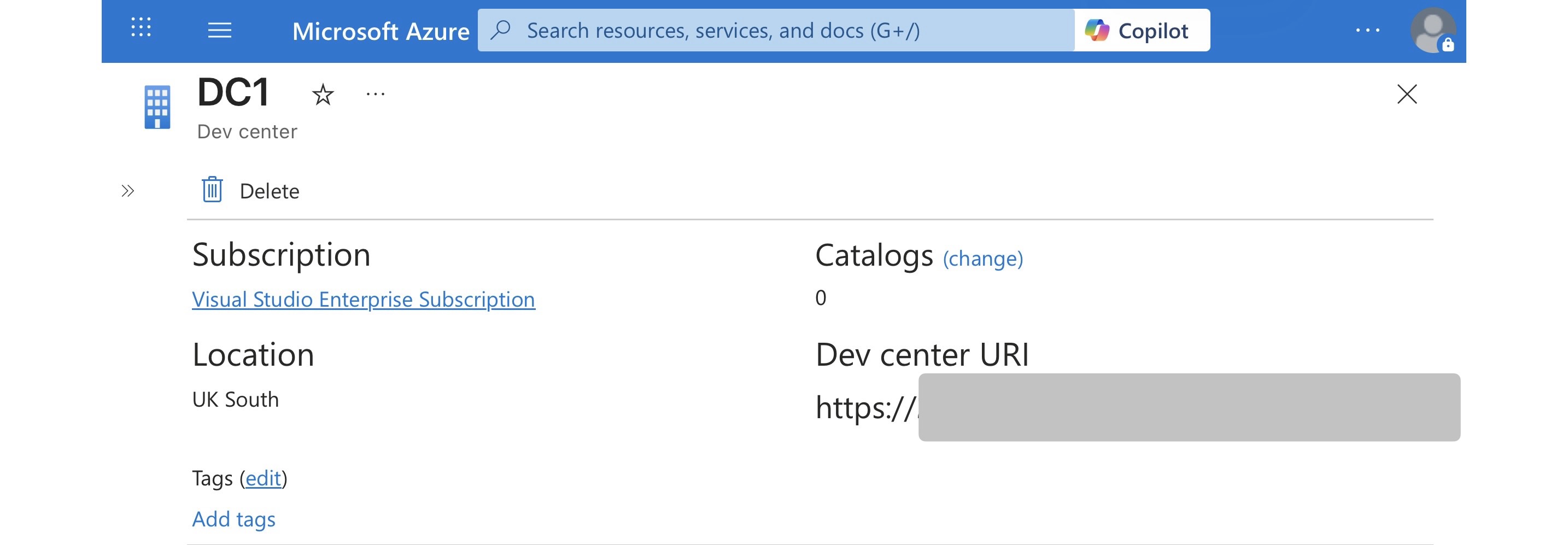
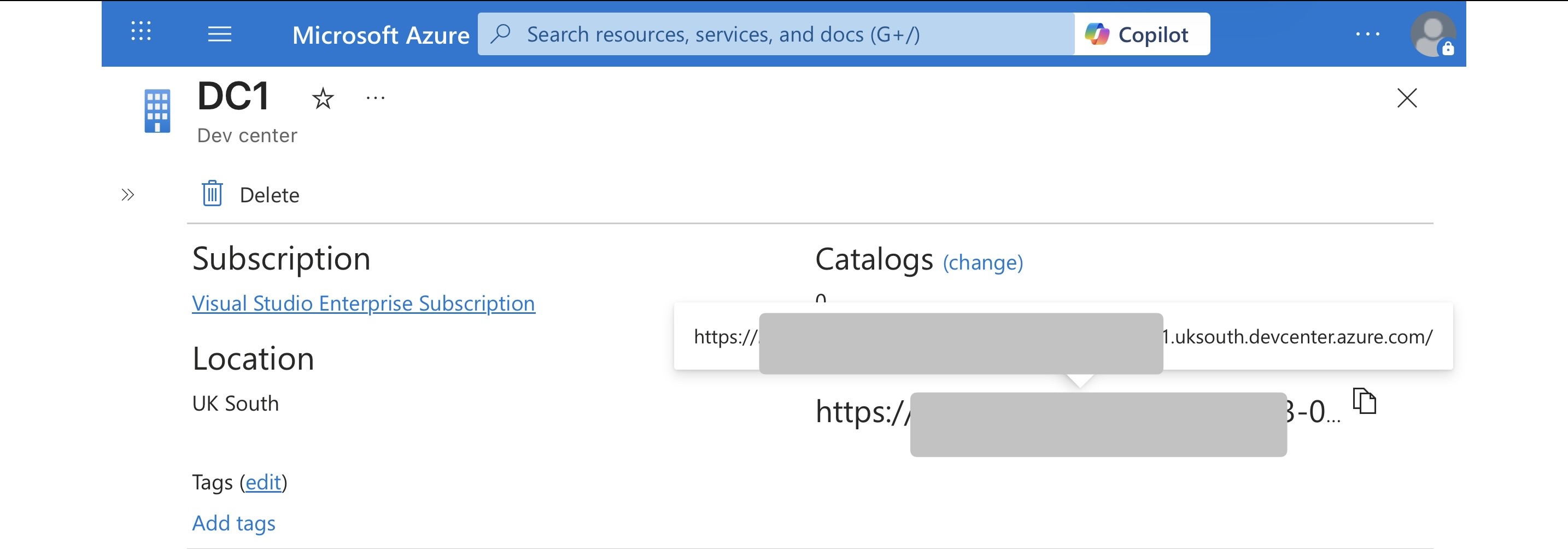
If you’re wondering where the {devCenterUri} comes from - it’s not guesswork.
You can retrieve it directly from the Azure Portal:
- Go to Azure Portal
- Navigate to Dev Box
- Select the Dev Center you want
- Copy the Dev Center URI shown in the overview
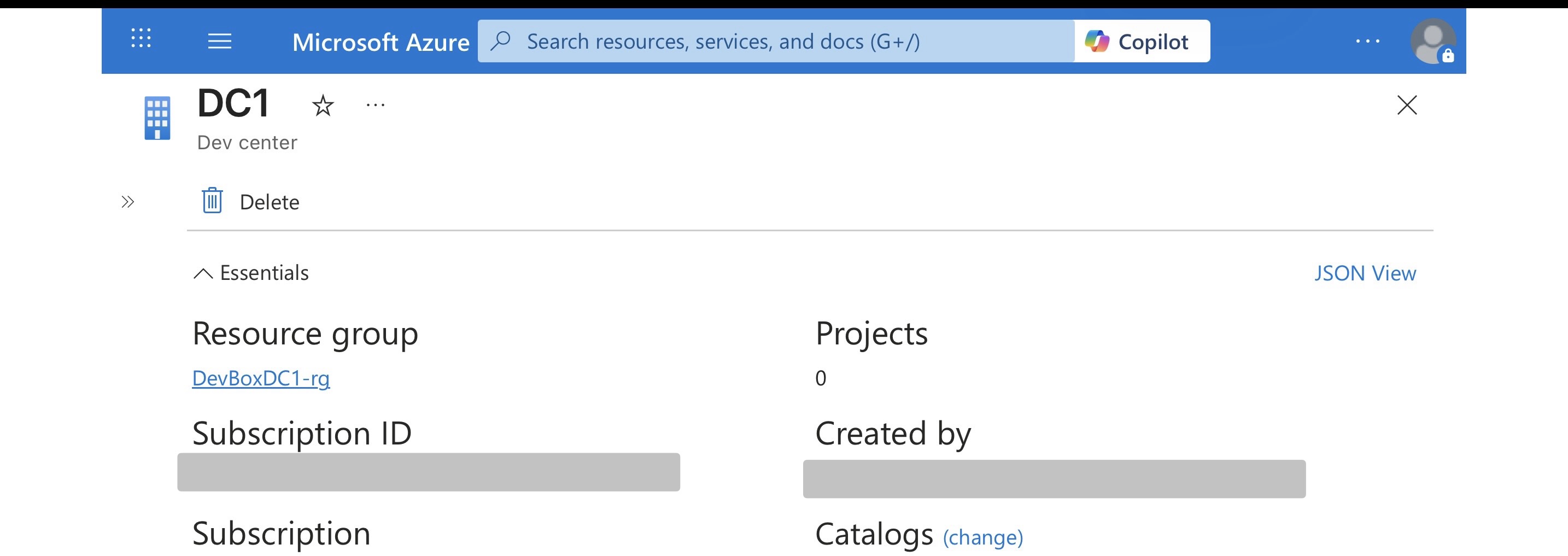
That URI is exactly what you pass into the deep link.
An interesting twist: Windows 365 already does this properly
Here’s the part that makes this extra frustrating.
The Windows 365 portal:
https://windows.cloud.microsoft
will happily:
- Display Windows 365 Cloud PCs
- Display Dev Box machines
- From the same user session
And it does so without requiring ARM access.
Why?
Because Windows 365 is a pre-provisioned, admin-managed desktop experience.
End users are expected to:
- Connect
- Disconnect
- Resume sessions
Not:
- Enumerate resource topology
- Create or delete compute
- Manage pools or projects
So the portal is built accordingly.
The downside?
From the Windows 365 portal you cannot:
- Create Dev Boxes
- Delete them
- Start / stop / hibernate / resume via management actions
Because that’s not what the W365 UX is designed to expose.
But the important takeaway is this:
Microsoft already knows how to surface Dev Box access without user-delegated ARM impersonation.
The capability exists.
It’s just inconsistently applied.
A small but pointed side-eye 👀
Why there isn’t:
- a vanity URL per Dev Center
- a first-class “direct access” link surfaced in the Dev Box portal
- or official documentation that says “here’s how to avoid allowing ARM”
…is genuinely baffling.
The safer path exists.
It’s just not documented.
Which makes this a very on-brand entry in What The Entra Fudge?!.
The real takeaway
Where possible, prefer landing users directly into a single Dev Center via the undocumented deep-link rather than allowing user-delegated ARM enumeration.
Note: The
singledevcentermodeparameter is currently undocumented. While it works today and is a practical mitigation, treat it as a best current practice rather than a guaranteed supported endpoint.
This isn’t about Dev Box being insecure.
It’s about control plane boundaries collapsing because of portal design choices.
If you remember one thing from this post, make it this:
If a portal requires user-delegated ARM access, Conditional Access cannot distinguish “read-only UX” from “management plane exposure.”
When that happens, you either:
- accept the blast radius, or
- find a different access path
In this case, the better path exists – quietly.
Design for runtime behaviour.
Not documentation intent.
And always ask:
“Why does this portal need to impersonate me at all?”